January 17th, 2026 by admin
Size Isn’t Everything with Databases – Nor When It Comes to Database Driver size.
With QStudio and Pulse, we get to work hands-on with 30+ databases. That gives us a lot of appreciation for teams that do more with less – especially some of the smaller teams building compact databases and drivers that deliver an outsized amount of value.
In both Pulse and QStudio, we bundle a core set of JDBC drivers and optionally download others when a user adds a specific database. We do this deliberately to keep the applications lightweight. We care about every megabyte and don’t want to bloat either our product or our users’ SSDs.
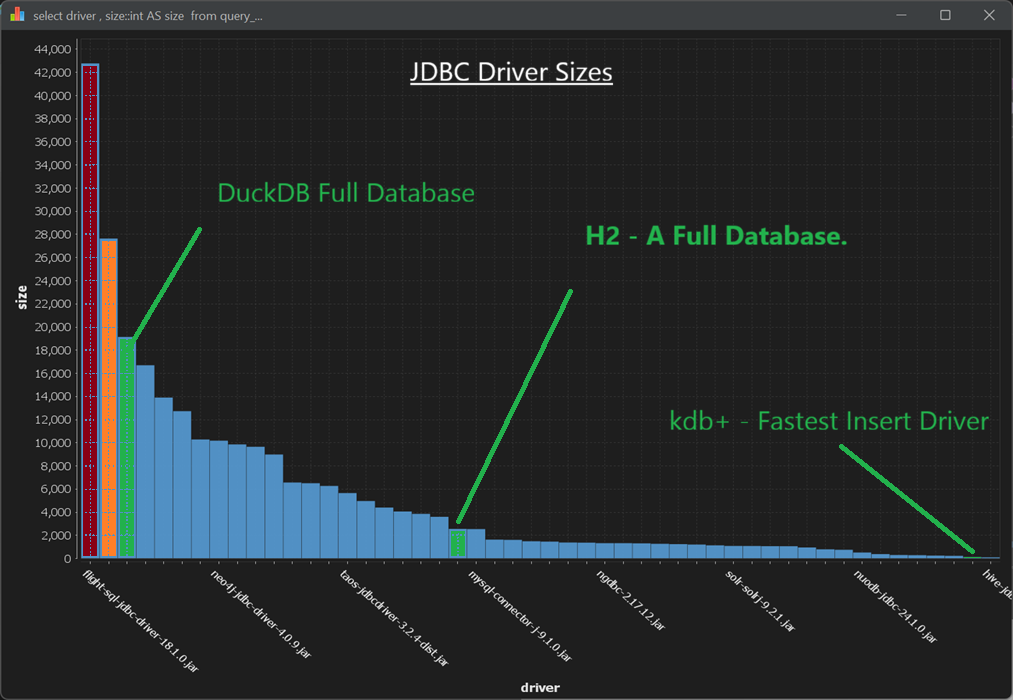
Database Driver Size
Notice:
- DuckDB – An entire database that is smaller than both the Snowflake and the Arrow/flight SQL driver.
- H2 – Another full database (Java-specific) that is smaller than roughly a third of the drivers we ship.
- Kdb+ – Supports JDBC and has the fastest industry wide bulk inserts while being one .java file (1900 lines, 60KB)
Obviously, a smaller driver or database isn’t always “better” in isolation. But having worked closely with these three in production settings, we can say they are exceptional pieces of engineering. The performance these teams achieve with such compact codebases is a testament to strong engineering discipline and a relentless focus on efficiency end-to-end. Huge congratulations to the teams behind them.
Scale matters but Efficiency is what makes scale sustainable.
Database Driver Size
Full Sizes (in KB):
42776 flight-sql-jdbc-driver-18.1.0.jar
27644 snowflake-jdbc-3.13.6.jar
19144 athena-jdbc-3.2.0-with-dependencies.jar
16696 kyuubi-hive-jdbc-shaded-1.7.1.jar
13904 ignite-core-2.15.0.jar
12728 sqlite-jdbc-3.42.0.0.jar
10284 kylin-jdbc-5.0.0-alpha.jar
10180 neo4j-jdbc-driver-4.0.9.jar
9856 trino-jdbc-422.jar
9652 presto-jdbc-0.282.jar
8984 redshift-jdbc42-2.1.0.28.jar
6564 jt400-20.0.0.jar
6504 presto-jdbc-350.jar
6268 mongodb-jdbc-2.0.2-all.jar
5652 taos-jdbcdriver-3.2.4-dist.jar
4964 gemfirexd-client-2.0-BETA.jar
4400 ojdbc8-19.19.0.0.jar
4060 jdbc-1.30.22.3-jar-with-dependencies.jar
3856 omnisci-jdbc-5.10.0.jar
3600 derby-10.15.2.0.jar
2556 h2-2.2.224.jar
2540 mysql-connector-j-9.1.0.jar
1628 hsqldb-2.7.2-jdk8.jar
1608 hsqldb-2.7.2.jar
1488 jdbc-3.00.0.1-jar-with-dependencies.jar
1456 redis-jdbc-driver-1.4.jar
1380 clickhouse-jdbc-0.6.0.jar
1368 jdbc-1.30.22.5-jar-with-dependencies.jar
1324 ngdbc-2.17.12.jar
1324 ngdbc-2.17.10.jar
1308 mssql-jdbc-10.2.1.jre8.jar
1268 avatica-core-1.17.0.jar
1240 clickhouse-jdbc-0.4.6.jar
1204 terajdbc-20.00.00.11.jar
1136 sqream-jdbc-4.5.9.jar
1084 solr-solrj-9.2.1.jar
1080 solr-solrj-9.3.0.jar
1064 postgresql-42.7.4.jar
1060 jdbc-4.50.4.1.jar
952 snappydata-store-client-1.6.7.jar
792 x-pack-sql-jdbc-7.9.1.jar
752 crate-jdbc-2.7.0.jar
516 nuodb-jdbc-24.1.0.jar
380 ucanaccess-5.0.1.jar
300 clickhouse-jdbc-0.2.6.jar
284 taos-jdbcdriver-3.2.1.jar
248 csvjdbc-1.0.40.jar
228 ignite-core-3.0.0-beta1.jar
124 lz4-pure-java-1.8.0.jar
100 hive-jdbc-1.2.1.spark2.jar
December 6th, 2025 by admin
QStudio 5.0 is now Open Source after 13 years of development!
QStudio remains a fast, modern SQL editor supporting over 30 databases including MySQL, PostgreSQL, DuckDB, QuestDB, and kdb+/q. Version 5.0 continues our focus on performance, analytics and extensibility now with an open community behind it.
🎉 QStudio Is Now Open Source
After 13 years of development, QStudio is now fully open source under a permissive license. Developers, data analysts and companies can now contribute features, inspect the code, and build extensions.
Open Source Without the Fine Print.
No enterprise edition. No restrictions. No locked features. QStudio is fully open for personal, professional, and commercial use.
New Features with 5.0
New Table Formatters, Better Visuals, Better Reporting
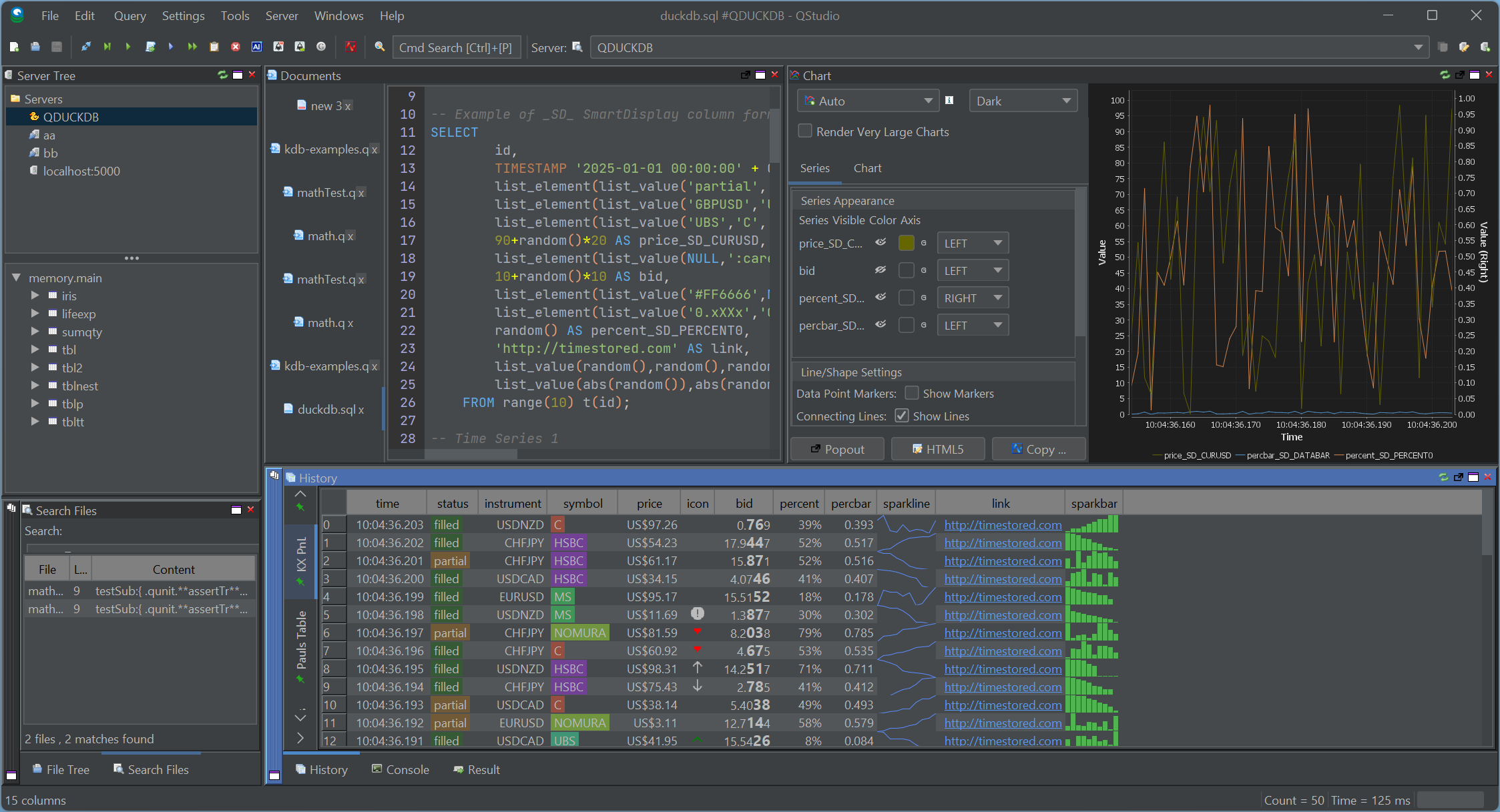
 SmartDisplay is QStudio’s column-based automatic formatting system. By adding simple _SD_* suffixes to column names, you can enable automatic number, percentage, and currency formatting,Sparklines, microcharts and much more. This mirrors the behaviour of the Pulse Web App, but implemented natively for QStudio’s result panel.
Spark Lines + Micro Charts

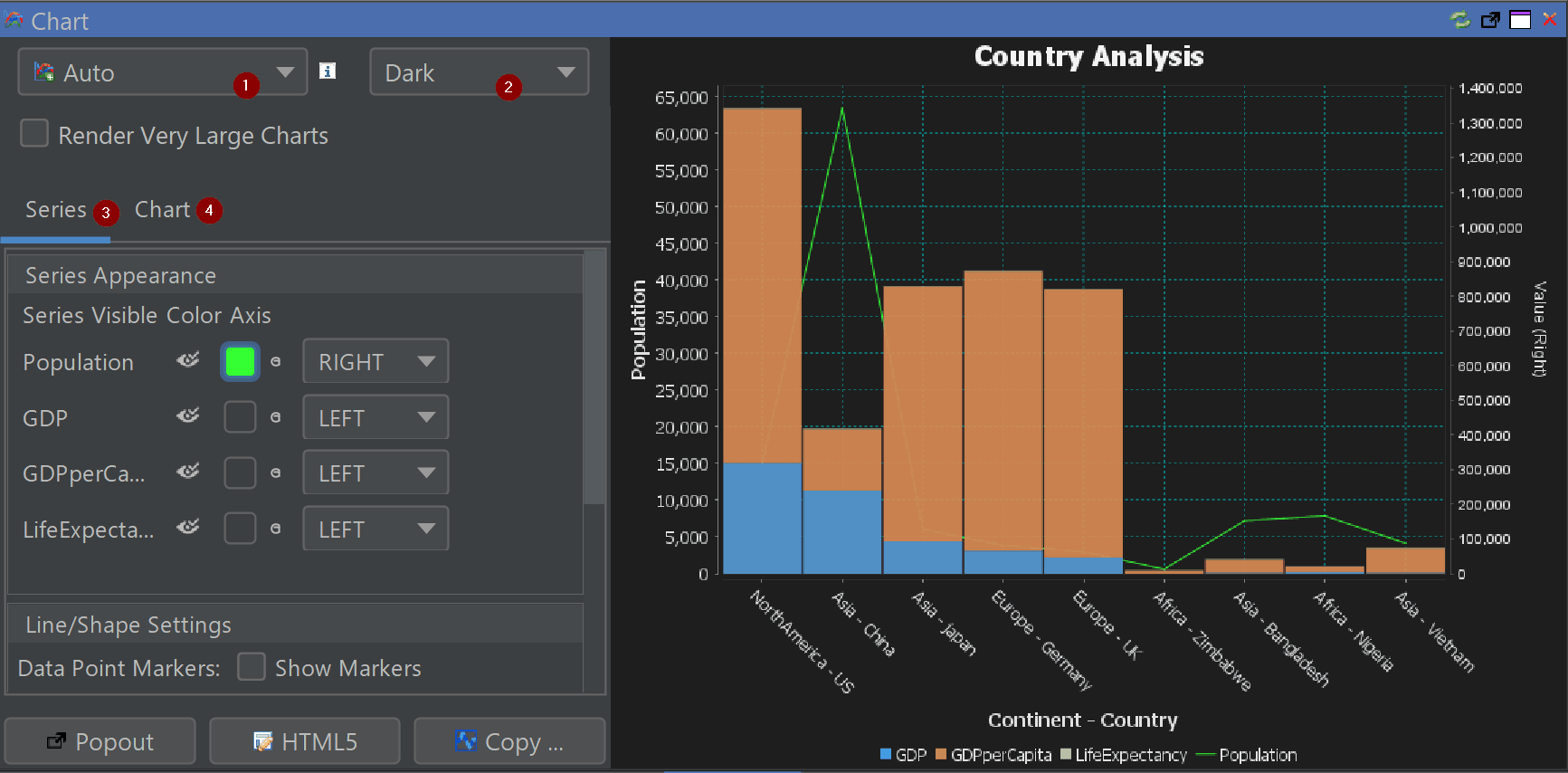
Comprehensive Chart Configuration
Fine-tune axes, legends, palettes, gridlines and interactivity directly inside the chart builder.
New Chart Themes
Excel, Tableau and PowerBI-inspired styles for faster insight and cleaner dashboards.

Other Major Additions
- Back / Forward Navigation — full browser-like movement between queries.
- Smart Display (SD) — auto-formats tables with min/max shading and type-aware formatting.
- Conditional Formatting — highlight rows or columns based on value rules.
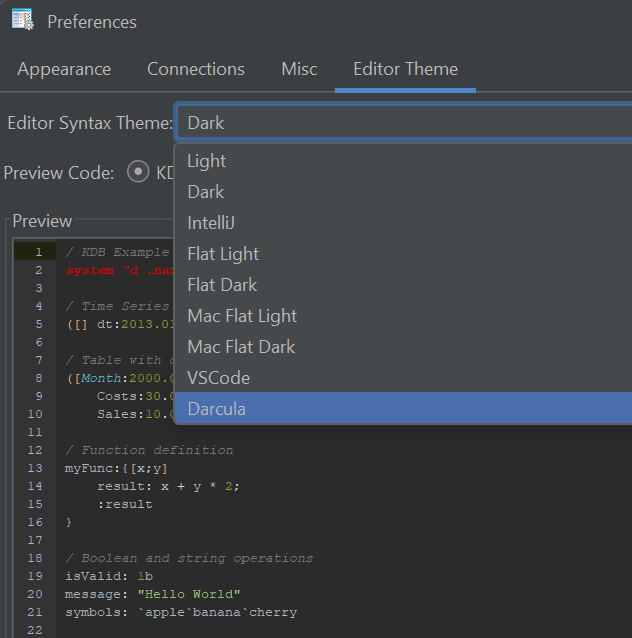
- New Code Editor Themes — dark, light and popular IDE-style themes.
- Extended Syntax Highlighting — Python, Scala, XPath, Clojure, RFL, JFlex and more.
- Improved kdb+/q Support — nested / curried functions now visible and navigable.
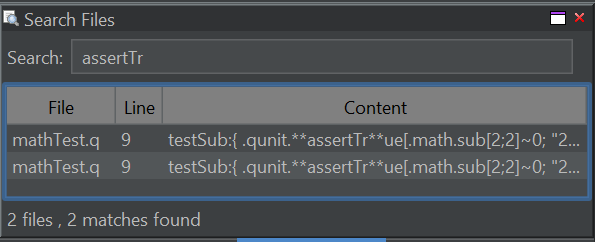
- Search All Open Files (Ctrl+Shift+F)
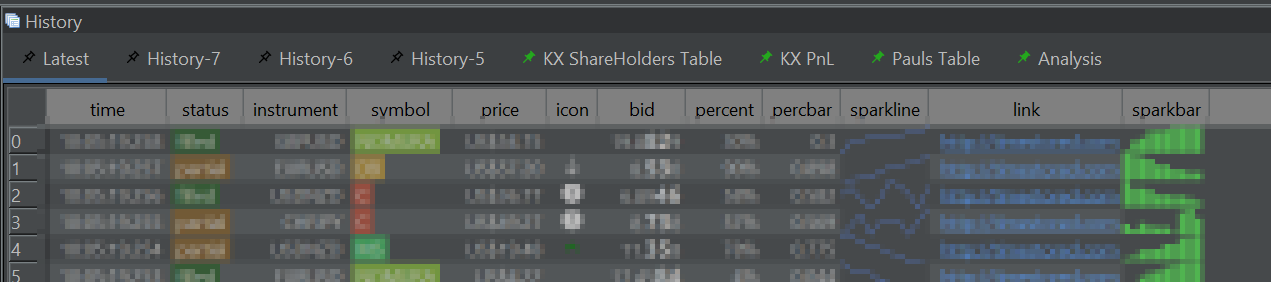
- Navigation Tabs in Query History — with pinning.
- Improved Chinese Translation
- DuckDB Updated to latest engine.
- Hundreds of minor UI and performance improvements
- Legacy Java Removed — cleaner, modern codebase.
Code Editor Improvements
Better auto-complete, themes and tooling for large SQL files.
Pinned Results
Pin results within the history pane for later review or comparison.
Search Everywhere
Control+Shift+F to search all open files and your currently selected folder.
Our History
- 2013–2024: QStudio provided syntax highlighting, autocomplete, fast CSV/Excel export and cross-database querying.
- Version 2.0: QStudio expands support to 30+ Databases.
- Version 3.0: Introduced DuckDB integration, Pulse-Pivot, Improved export options.
- Version 4.0: Introduced SQL Notebooks and modern visuals.
- Version 5.0: Open Source + hundreds of improvements across charts, editing, navigation and data analysis.
We aim to create the best open SQL editor for analysts and engineers. If you spot a bug or want a feature added, please open an issue
January 2nd, 2025 by Ryan Hamilton
PyArrow dowloads
- Open source tools are now as performant as pre-existing commercial offerings for data analysis and in many ways offer more features.
Proof: See the time-series benchmarks and note how many are open source: https://www.timestored.com/data/time-series-database-benchmarks
- Everyone has discovered that column-oriented storage and vector execution is the secret to fast analytics.
- Arrow format has won. It is now a cornerstone technology used in python, numpy, polars, duckdb, R.
Pandas replaces numpy with arrow, DuckDB quacks arrow, QuestDB will support arrow, InfluxDB (2023), Polars is built upon Apache Arrow.
- Apache parquet has won as the lowest common denominator for basic data storage.
QuestDB queries parquet, DuckDB supports parquet (2021), Clickhouse , GreptimeDB uses Arrow and Parquet.
- Iceberg vs Delta vs Hudi. Iceberg won. AWS announcement.
Trends of 2024
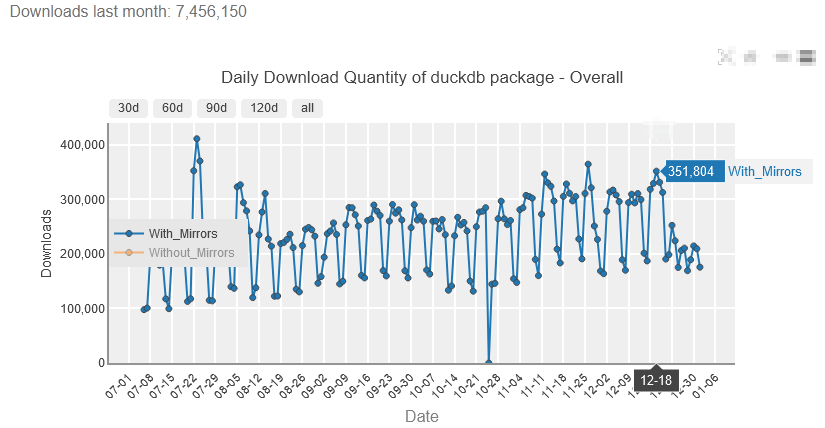
DuckDB is on course to become the defacto column oriented database that all others will be compared to.
Clickhouse conquered a number of enterprises but difficuly deploying and getting started now seem like key factors that held it back.
DuckDB Downloads
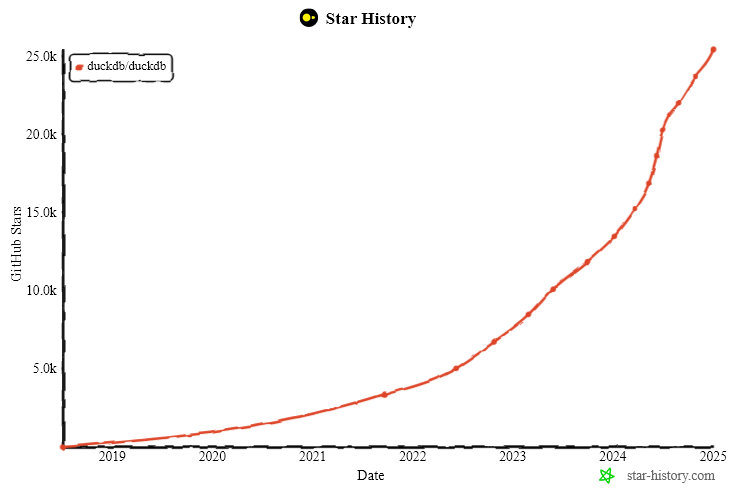
DuckDB Stars
Underlying Factors
Why has SQL and python won? In many ways these are terrible languages (GIL , SET theory) but they won? I can’t say all the reasons but some things that I believe worked in favour:
- Open Source + Free = Hard to beat. We’ve seen open-source companies (license disputes mentioned below) take over every area. VCs and startups have realised making big money selling dev tools requires solving two problems: distribution + technology and the harder one is now distribution. The important thing is getting your product into the hands and heads of as many people as possible. Once there, you can withhold all useful enterprise features and charge for them, assuming AWS doesn’t try the same trick. I do wonder if this is causing the death of otherwise small viable software bsuinesses.
- Google = a second brain that worked on keyword search. Languages that had judicial overloading are harder to search than languages with many function names. Google makes it easier to find uniquely named functions that python has. Does anyone still read the manual? nevermind the 500+ page language bibles that were the only way to learn languages 20 years ago?
- AI – It hasn’t been a factor to date but AI is similar to the google benefit but even more. The more data and usage, the more chance AI can write your code, write your query etc. Will this reinforce the benefit that fully expanded syntax and popularity already provides? APL could be even more dead than it is already.
