Archive Page 3
October 3rd, 2023 by admin
We just announced a unique event that gathers 4 of the newest, most advanced databases for Finance into 1 hour:
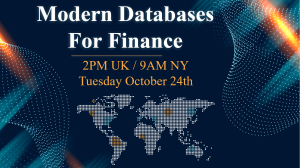
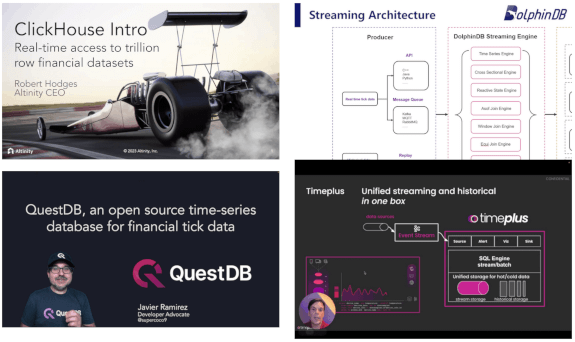
If you work on big data in Finance, this is your chance to get an overview of the rapidly changing database landscape. TimeStored will be organizing a free online presentation, each database company will present 10 minutes on what is unique to their solution. Bringing together the top new technologies together in one place.
Tuesday 24th October – 2-3PM UK
SIGN UP NOW
September 15th, 2023 by admin
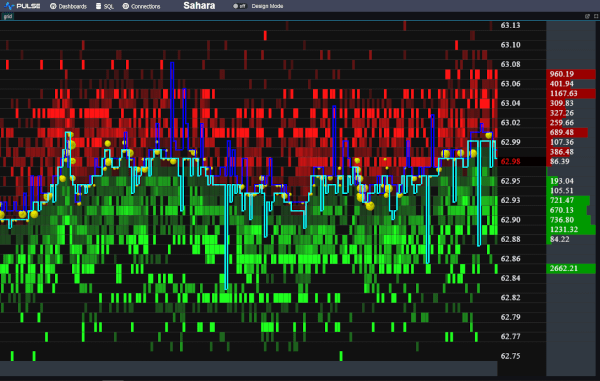
We want to be the best finance streaming visualization solution. To achieve that, we can’t just use off the shelf parts, we have built our own market data order book visualization component from scratch, it’s only dependency is webgl. We call it DepthMap. It plots price levels over time, with the shading being the amount of liquidity at that level. It’s experimental right now but we are already receiving a lot of great feedback and ideas.
Faster Streaming Data
A lot of our users were capturing crypto data to a database, then polling that database. We want to remove that step so Pulse is faster and simpler. The first step is releasing our Binance Streaming Connection. In addition to our existing kdb streaming connection, we are trialling Websockets and Kafka. If this is something that interests you , please get in touch.
June 13th, 2021 by admin
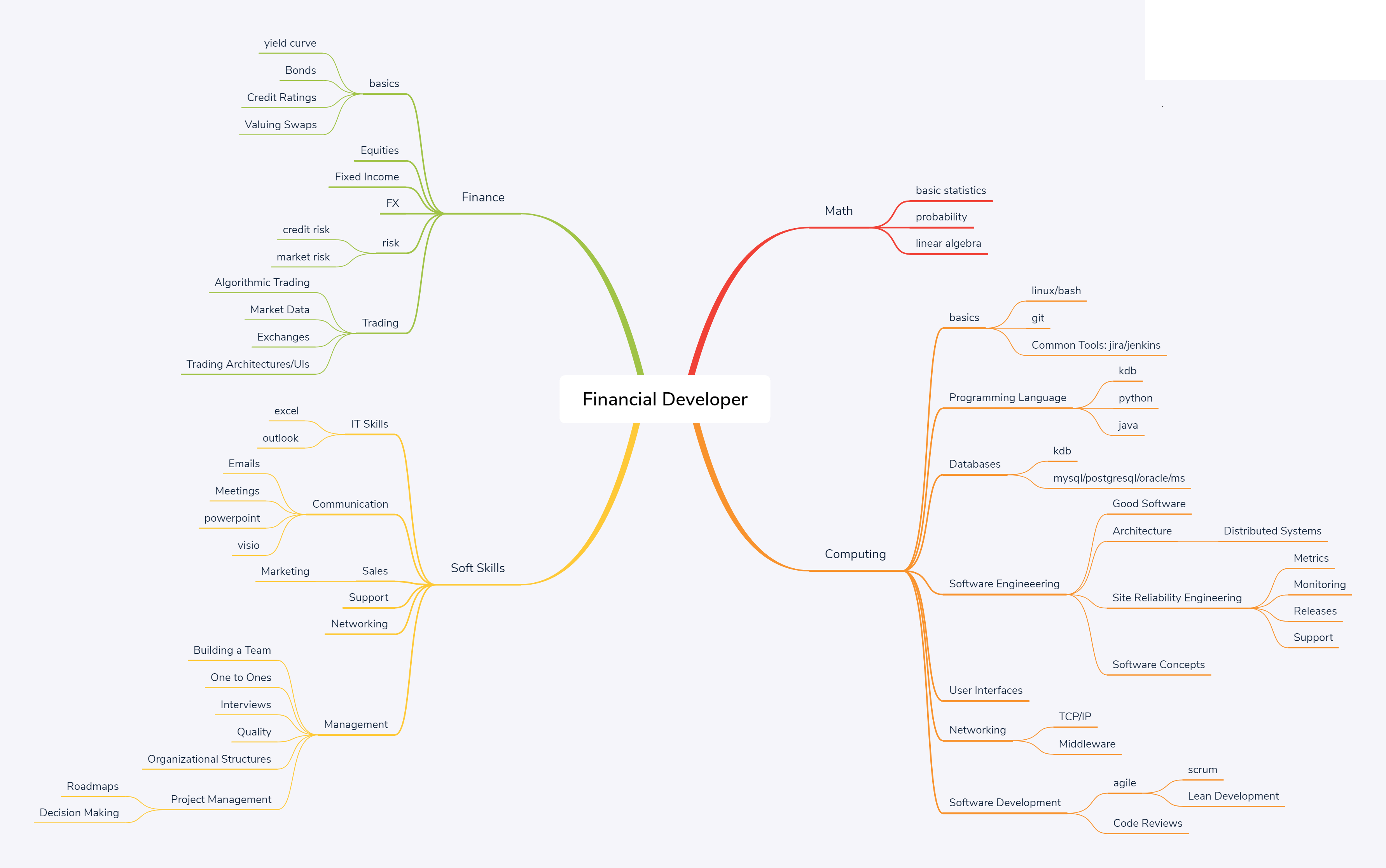
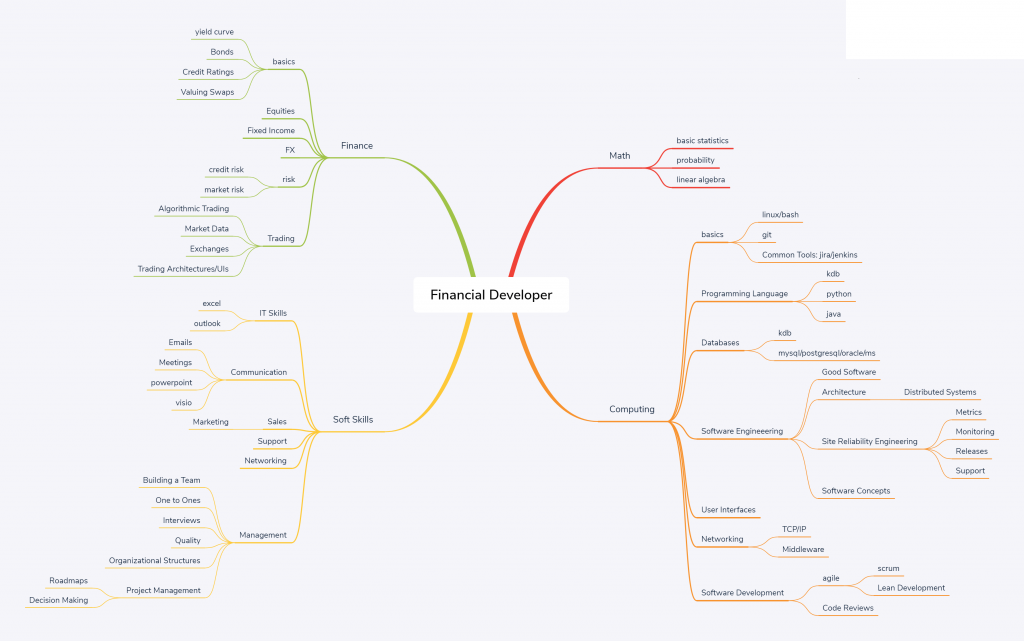
The below network diagram is intended as an outline of the skill set required for a financial software developer.
Note:
- Most individuals should aim to have a strong core. Think of it like a pyramid, where the height is the strength of a skill. Core skills like general computing principles, probability, communication should be built “tall” and very strong. peripheral skills such as python/monitoring will be weaker. An individual will typically only learn 1 or 2 niche areas strongly (T shaped)
- Notice the rough relative sizes of the areas. 55% computing, 10% math, 15% soft skills, 20% finance. This is intended to represent the rough allocation of effort.
- If you only bring 95% techinical skills, you are going to waste time building the wrong thing, build something no one wants or build something useful but no one will know as you haven’t the soft skills to sell it.
- The management branch on the bottom left is optional.
Computing
| Skill |
Topic |
Sub-Topic |
Links |
Requirement |
| basics |
|
|
|
|
| linux |
|
surrey |
Change Directories, edit config files, kill processes, copy/move files, check disk space. |
| bash |
|
tldp.org |
Write a script to periodically sync a directory between servers and schedule it using cron. |
| git |
|
git-scm |
Checkout, branch, commit, push code. |
| Common Tools: jira/jenkins |
|
user-stories |
Write a good jira, assign owner. Kick off a build on a common CD platform. |
|
|
|
|
|
| Programming Language |
|
|
|
Knowledge of 2 different programming paradigms. |
| kdb |
|
kdb-tree |
Write efficient selects for pulling back a subset of data. |
| python |
|
|
Download data from a REST api, calculate average/mean/median for certain metrics. |
| java |
|
book |
Write a java program to count the number of words in a file. |
|
|
|
|
|
| Databases |
|
|
|
Be aware of the major types of database available and when to use each. |
| kdb |
|
kdb-tree |
|
| mysql/postgresql/oracle/ms |
|
|
Know standard SQL. |
|
|
|
|
|
| Software Engineeering |
|
|
peopleware |
How to grow good software. |
| Good Software |
|
|
Properties of good software with examples. |
| Architecture |
|
|
Common Enterprise software patterns. |
| Distributed Systems |
|
Difficulties with distributed systems and common patterns to solve them. |
| Data Processing Pipelines |
|
Common processing Pipeline Patterns |
| Site Reliability Engineering |
|
SRE |
How reliable should software be? |
| Metrics |
|
Ccommon metrics used to measure reliability and when to use each |
| Monitoring |
|
What monitoring systems/tools are available? What are monitoring best practices? |
| Releases |
Accelerate |
|
| Support |
|
Handling outages. Engaging with users. |
| Software Concepts |
Testing |
|
Testing Methods and knowledge of one test framework |
|
|
|
|
|
| User Interfaces |
|
|
dont-think |
What makes a good user interface? |
|
|
|
|
|
| Networking |
|
|
|
How computers connect. Expected latency/bandwidth. |
| TCP/IP |
|
|
ports, switches, racks, data centres, windows. |
| Middleware |
|
|
Messaging midddleware: solace/JMS/kafka/MQ. |
|
|
|
|
|
| Software Development |
|
|
|
|
| agile |
|
|
|
| scrum |
book |
Sprints, iterations, standups, restrospectives, story-time. |
| Lean Development |
lean-startup |
When, why and how to develop lean. |
| Code Reviews |
|
pragma |
Code review best practices. |
Soft Skills
| Skill |
Topic |
Sub-Topic |
Links |
Requirement |
| IT Skills |
|
|
|
|
| excel |
|
|
Create a table with conditional formatting, calculate sum/average of column, use vlookup |
| outlook |
|
|
Filter emails, create meetings. |
|
|
|
|
|
| Communication |
|
|
|
|
| Emails |
|
|
How to write an email to users, team mates, managers, senior management. |
| Meetings |
|
atlassian |
What is a meeting meant to accomplish? How to achieve that. |
| powerpoint |
|
|
Prepare a presentation for management. |
| visio |
|
|
Draw an architectural diagram of your system. |
|
|
|
|
|
| Sales |
|
|
|
|
| Marketing |
|
Traction |
How to get your software used and appreciate by more users. |
| Support |
|
|
|
|
| Networking |
|
|
|
Building a network to get things done. |
|
|
|
|
|
| Management |
|
|
Grove |
|
| Building a Team |
|
Dysfunctions |
|
| One to Ones |
|
|
What makes a good one-to-one |
| Interviews |
|
|
How to evaluate cnadidates effectively. |
| Quality |
|
|
How to ensure quality of product. |
| Organizational Structures |
|
phoenix |
Different structures for management. |
| Project Management |
|
|
|
| Roadmaps |
|
|
| Decision Making |
|
Which approach to decision making to use when. |
October 24th, 2020 by admin
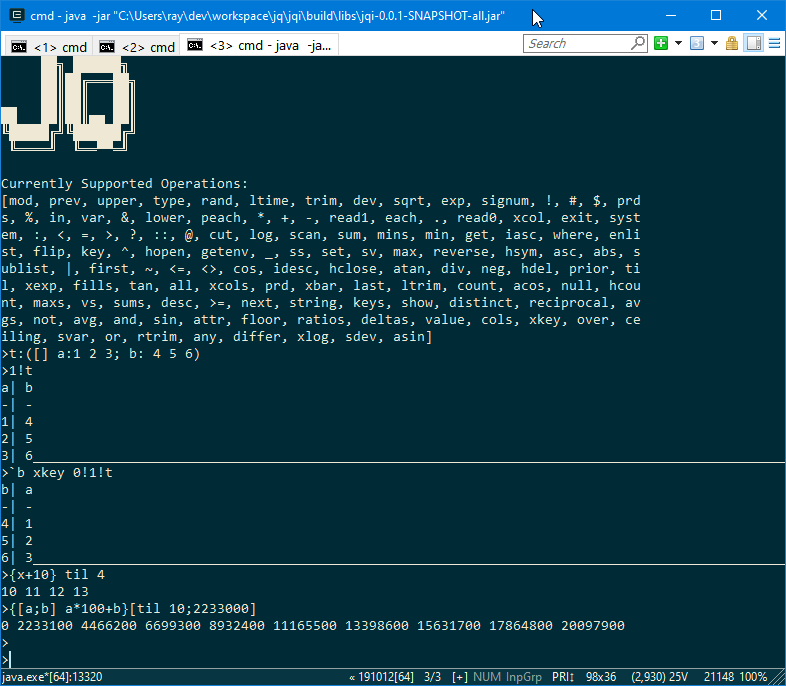
Jq has now added support for:
- Functions – {x+1}. Unnamed parameters beyond x don’t yet work so please name all your parameters.
- Keyed table operations: xkey, 1!, 2!, keys, value.
- New keywords supported: in, distinct, inter, except, rank, sv, vs, sum, prd, xlog.
- Improved compatibility and support of: null, avg, var, iasc, upper, lower, fills, fill, ^, sublist, prds, sums.
The added keywords in most cases will only support the most common types and arguments.
Mixed lists in particular are not handled well by most keywords but we will continue to improve.
September 9th, 2020 by admin
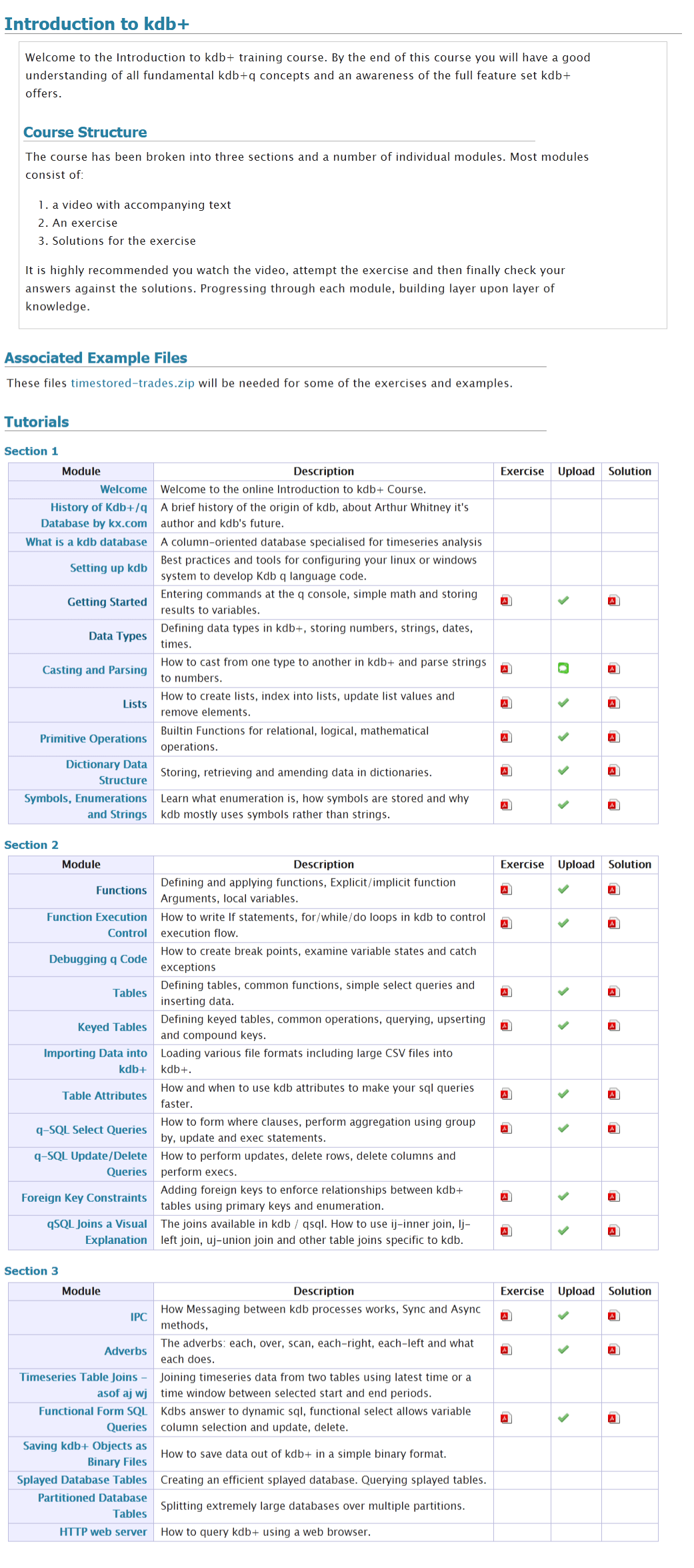
We often get asked what is in our online training course.
We do describe this on the course page and in a PDF to be be totally thorough here’s a screenshot of our full listing:
January 22nd, 2020 by admin
Shakti
The biggest shakeup in the KDB world was Arthur Whitney, the founder of KX and creator of KDB selling his stake in KX and moving on to creating a new version of the K language called Shakti. “Shakti merges database, language, connectivity and stream processing into one powerful platform “. So far it appears to overlap heavily with kdb functionality, adding further cryptographic features, while not yet supporting on-disk storage.
KDB Version 3.7 Changes:
- App Direct Mode – give users control over Intel Optane DC Persistent Memory.
- Multi-Threaded Primitive Operations
- Data at Rest Encryption.
KDB Version 3.6 Changes:
- Websocket – Improvements and bugfixes
- Speed Improvements
- When attributes present use them more often.
- Improved Error Reporting
- Broken or closed handles report their number
- Fatal memory errors log a timestamp
FD/KX Products:
January 22nd, 2020 by admin
kdb Version 3.6 Changes:
- Enums and linked columns now use 64 bit indices
- This is a disk-format change, i.e. newly saved data will NOT be backwards compatible.
- 3.6 will be able to read data in the old format
- AnyMap – Mapped Nested Types
- Ability to save unmappable compound objects with >2 billion elements
- Mapped list elements can be of any type and are data remains mapped NOT copied to heap.
- Symbols are automatically enumerated against a file with three ###s in the name.
- Deferred Response – -30!x Allows a deferred response to a sync query. In practice it is difficult to use correctly.
- New Functions:
- .Q.hg – HTTP get allows retrieving web page as a list of strings.
- .Q.dtps/.Q.dpfts added to allow specifying the enum domain
- .Q.sha1 – SHA-1 encode text
- .Q.ts – Allows timing a function call similar to apply “.”.
- xcol – Now supports dictionary to remap column names
- -27! to allow formatting similar to .Q.d
- .j.jd – Allows specifying dictionary of options when calling json serialization.
- .Q.btoa – Base 64 encode
- .Q.hp – HTTP Post – .Q.hp[url;mimeType;query]
- Performance Improvements on
- grouping
- filtering
- particularly when attributes present
- SSL – Improvements and bugfixes
- WebSockets – Improvements and bugfixes
November 25th, 2018 by admin
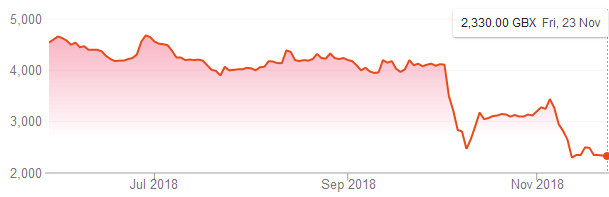
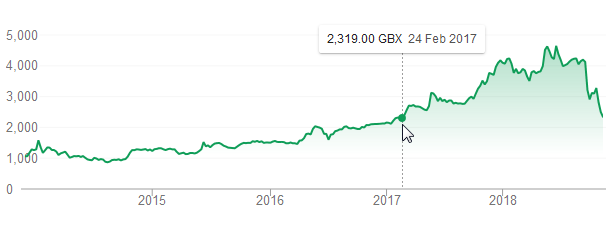
First Derivatives Shares have fell back to a price last seen in February 2017:
One cause of the fall has been a damning article by ShadowFall. Their main arguments are:
- First Derivatives was being priced highly as a software company
- It is not a software company but a consultancy.
- Previously good years were due to outside factors (property prices and government grants)
- They have made a significant investment in KX which may itself have stopped growing
The 47 page report goes into a lot of detail, to give an idea here’s one of the charts:
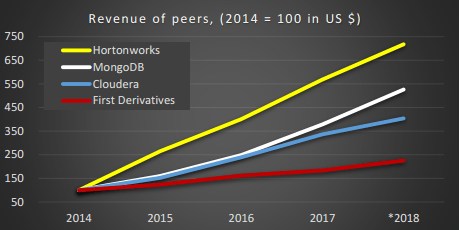
He shows numerous statistics for FD compared to it’s peers, operating margin, gross margin, revenue, headcount. It’s worth a read if you have an interest in kdb/KX/FD.
Related Links: Shadowfall tweet, Independent.ie.
April 2nd, 2018 by admin
qStudio 1.45 Released, we have:
- Bugfix: Ctrl+F Search in source fixed. (Thanks Alex)
- Added Step-Plot Chart display option
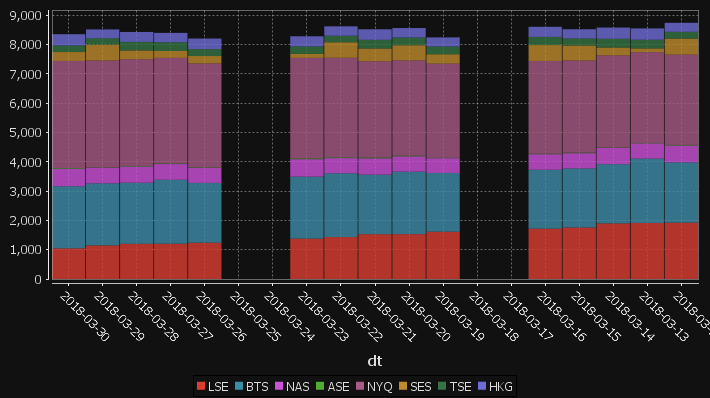
- Added Stacked Bar Chart display option
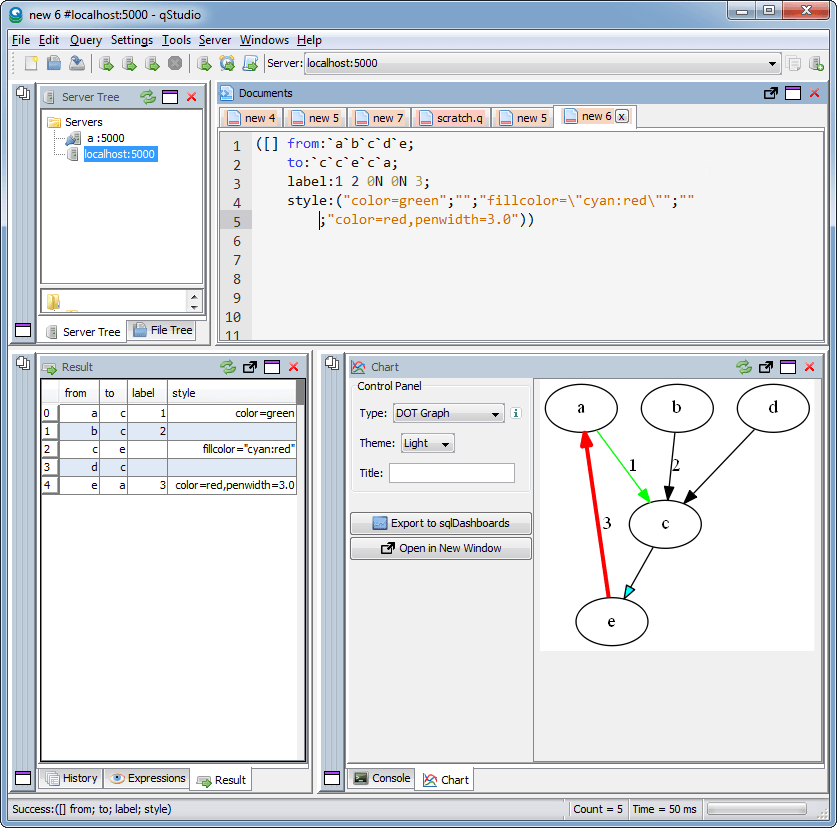
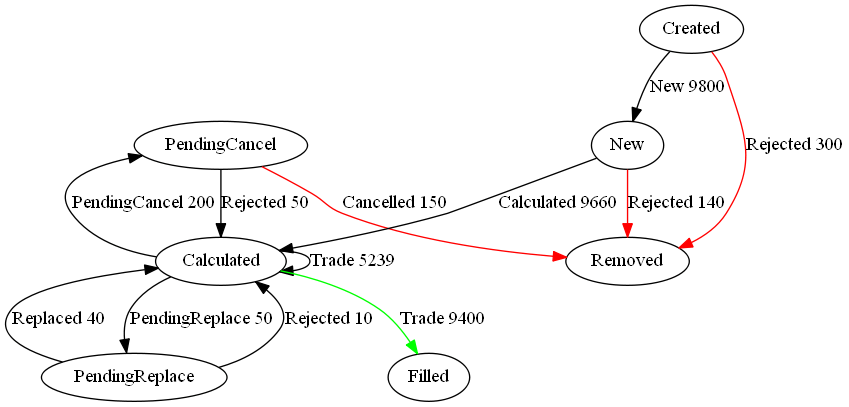
- Added Dot graph render display option (Inspired by Noormo)
- Bugfix: Hidden folders/files regex now works again in file tree and command bar. Target and hidden folders are ignored by default.
- Bugfix: Mac was displaying startup error with java 9
Download
Some example charts:
April 2nd, 2018 by admin
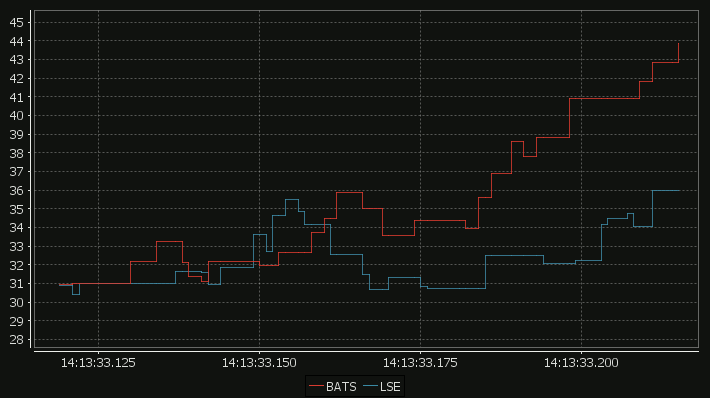
Our standard time-series graph interpolates between points. When the data you are displaying is price points, it’s not really valid to always interpolate. If the price was 0.40 at 2pm then 0.46 at 3pm, that does not mean it could be interpreted as 0.43 at 2.30pm. Amazingly till now, sqlDashboards had no sensible way to show taht data. Now we do:
For comparison here is the same data as a time-series graph:
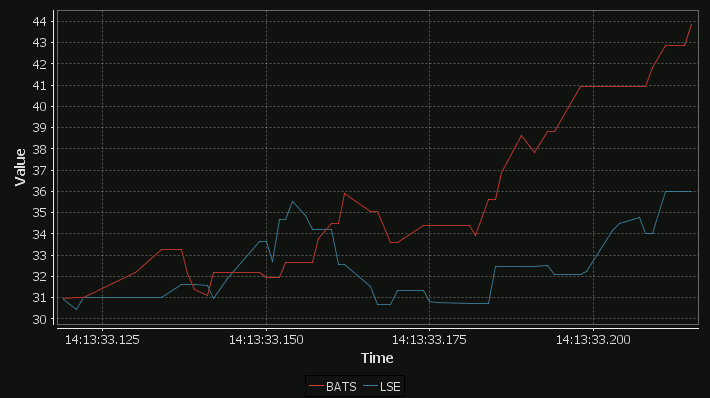
The step-plot is usable for time-series and numerical XY data series. The format is detailed on the usual chart format pages.