

q Linter - kdb+ Code Analysis
Contents
q Linter
QStudio includes a built-in linter for kdb+/q code that checks for errors, warnings and code quality issues. The linter runs automatically when you save a file and reports issues in the Problems Panel.
The linter catches common mistakes including:
- Assigning to reserved words like
countorsum - Unused variables and parameters
- Undeclared variables that will become unintended globals
- Deprecated internal functions that have q replacements
- Wrong number of arguments to namespace functions
- Code after a return statement (unreachable code)
Problems Panel
Lint results appear in the Problems Panel at the bottom of the screen. Each row shows the severity, file, line number, rule ID and message. Click any row to jump directly to the problem in the editor.
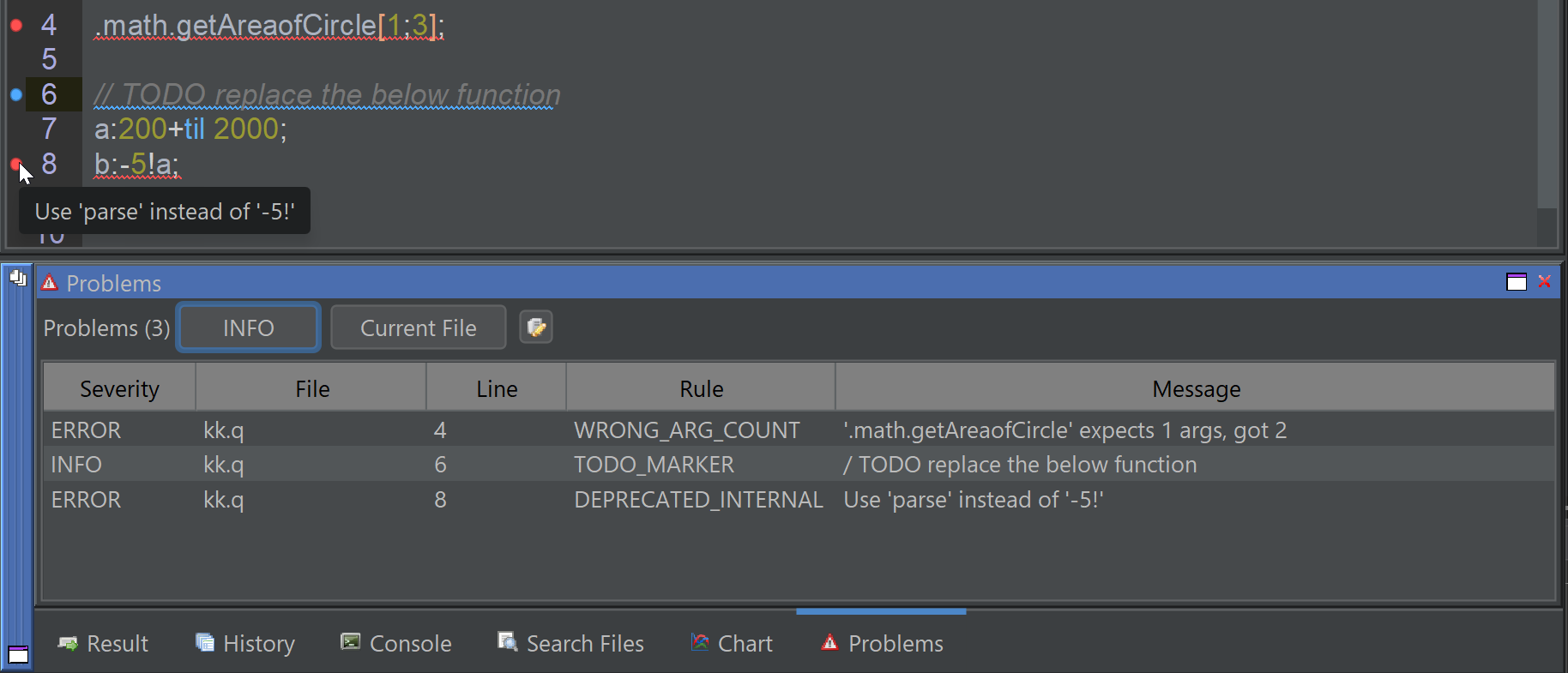
The Problems Panel updates automatically when you save a file. Only .q and .k files are linted.
Editor Highlighting
When filtering is enabled, lint issues are highlighted directly in the editor with:
- Squiggly underlines beneath the affected code — red for errors, orange for warnings, blue for info
- Colored circles in the gutter next to line numbers
Highlights clear automatically if you add or remove lines (since positions may shift) and reappear when you save.
The highlighting colors adjust for dark and light editor themes.
Filtering by Severity
The filter button in the Problems Panel toolbar cycles through severity levels:
| Filter | Shows |
|---|---|
| ALL | Errors + Warnings + Info |
| ERROR | Errors only |
| WARNING | Warnings + Errors |
| INFO | Info + Warnings + Errors (everything) |
| NONE | Nothing — hides all lint results and editor highlights |
The default is NONE so existing users are not surprised by new highlighting. Click the filter button to enable error display.
Changing the filter also updates the editor highlighting in real-time.
Configuring Rules
Click the gear icon in the Problems Panel toolbar to open the Configure Lint Rules dialog. Each rule can be individually enabled or disabled. Use the Select All / Select None buttons for quick toggling.
Rule configuration is per-session. Disabled rules are not persisted between restarts.
Suppressing Rules Per File
Add a comment at the top of your q file to suppress a specific rule for that file:
/ @qlintsuppress UNUSED_VAR
This prevents the UNUSED_VAR rule from firing anywhere in that file.
Multiple rules can be suppressed with separate comments.
Cross-File Analysis
When you have a folder open, the linter performs cross-file analysis. It builds an index of all namespace functions defined across your project files and can detect:
- Undefined references — calling
.trade.getPricewhen no file defines it (and the.tradenamespace is known) - Wrong argument count — calling a function with more arguments than it accepts
- Parameter type mismatches — passing a string literal where a parameter named
symexpects a symbol
Built-in namespaces (.Q, .q, .z, .h, .j, .o, .m, .log)
are never flagged since their contents cannot be verified statically.
All Lint Rules
The linter includes 38 rules across four categories.
Error Detection
| Rule | Severity | Description |
|---|---|---|
| ASSIGN_RESERVED_WORD | ERROR | Assignment to a reserved word (e.g. count:42) |
| COND_EVENARGS | ERROR | Conditional $ has even number of arguments (should be odd) |
| INVALID_ESCAPE | ERROR | Invalid escape sequence in string (e.g. "\q") |
| INVALID_ASSIGN | ERROR | Attempt to assign to a string, symbol, or number |
| DECLARED_AFTER_USE | ERROR | Variable was used before being declared |
| TOO_MANY_LOCALS | ERROR | Too many local variables in function (max 110) |
| TOO_MANY_GLOBALS | ERROR | Too many global assignments in function (max 20) |
| TOO_MANY_CONSTANTS | ERROR | Too many constants in function (max 110) |
| GLOBAL_PEACH | ERROR | Modifying globals inside peach is not allowed |
| RESERVED_NAME | ERROR | File has a name that conflicts with a q reserved word |
| UNDEFINED_REFERENCE | ERROR | Reference to undefined symbol in a known namespace (cross-file) |
| WRONG_ARG_COUNT | ERROR | Function called with wrong number of arguments (cross-file) |
| PARAM_TYPE_MISMATCH | ERROR | Literal argument type conflicts with parameter name hint (cross-file) |
| DEPRECATED_INTERNAL | ERROR | Internal function -N! has a q replacement (e.g. use parse instead of -5!) |
| UNARY_FORM | ERROR | Unary operator form (e.g. #:) should use q keyword (e.g. count) |
Code Quality Warnings
| Rule | Severity | Description |
|---|---|---|
| DEPRECATED_DATETIME | WARNING | Datetime type has been deprecated in favour of timestamp |
| EMPTY_IF | WARNING | If statement lacks code to execute |
| CAST_TYPE_NUMERICAL | WARNING | Casting using short type indicator (e.g. "i"$) is unnecessarily unclear |
| UNUSED_PARAM | WARNING | Parameter declared but never used in the function body |
| UNUSED_VAR | WARNING | Variable assigned but never referenced |
| UNDECLARED_VAR | WARNING | Undeclared variable will be treated as global |
| UNREACHABLE_CODE | WARNING | Code after a return statement is never executed |
| NEED_EXPLICIT_RETURN | WARNING | Function ends with assignment — returns generic null instead of a value |
| DEBUG_FUNCTION | WARNING | Debug function call (e.g. show) should not be in release code |
| CONDITIONALLY_DECLARED | WARNING | Variable may be undefined — declared only in one branch of a conditional |
| NAME_COLLISION | WARNING | Assignment could overwrite a built-in function |
| BACKWARD_COMPATIBILITY | WARNING | Feature may not be available in older kdb versions |
Style Warnings
| Rule | Severity | Description |
|---|---|---|
| LINE_TOO_LONG | WARNING | Line exceeds maximum length (default 120 characters) |
| FUNCTION_TOO_LONG | WARNING | Function exceeds maximum line count (default 40 lines) |
| TOO_MANY_PARAMS | WARNING | Function has too many parameters (default max 8) |
| UNDERSCORE_IN_NAME | WARNING | Underscore in name conflicts with the drop operator _ |
| XYZ_AS_LOCAL | WARNING | x/y/z used as local variable — reserved for implicit parameters |
| TRAILING_SEMICOLON | WARNING | Trailing semicolon before } causes function to return generic null |
| UNINDENTED_CODE | WARNING | Multiline expression must be indented after first line |
Informational
| Rule | Severity | Description |
|---|---|---|
| IMPLICIT_PARAMS | INFO | Function uses implicit parameters (x/y/z) — consider naming them |
| MULTIPLE_STATEMENTS_PER_LINE | INFO | Multiple statements on one line |
| TODO_MARKER | INFO | TODO, FIXME, HACK or XXX marker found in comment |