

Storing Applications in Git
- Note
- Available in Enterprise edition.
Applications can both be stored to git and released from file, enabling controlled deployment of applications via your git workflow.
Export Pulse Applications to Files
You can export Pulse applications to file using the Admin Menu
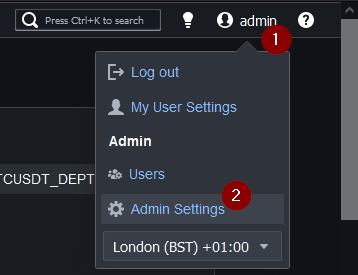
Then clicking Download Export.

This will produce a zip file download named pulse-export-DATEtTIME.zip which inside has the following folder structure:
Export Structure
pl-config
├── readme.txt
└── servers.txt
├── dash
    ├── 1_Trade_Surveillance.json
    ├── 2_Trade_Blotter.json
    ├── 3_FX_Dash.json
    ├── 4_Algo_Control.json
    ├── 5_TS.json
    └── 6_OHLC.json
- pl-config - Is short for PuLse config. It's a folder that can contain structured data for later importing to another Pulse instance. Currently it only supports applications but the folder structure allows for potentially adding more in future.
- dash - A folder with one JSON file per application. The beginning number is the application id.
- dash/1_dashboard_name.json - Each JSON file starts with the application id number and contains a JSON representation of a application..
- readme.txt - Provides a text only listing of users, teams, then applications. These are for human viewing purposes only. It can be useful to check this into git to track differences between servers.
- servers.txt - Provides a text only listing of servers with passwords blanked out. These are for human viewing purposes only.
Sample File
Deploy Applications From Files.
- Pulse watches for a folder named
pl-configrelative to its' current working directory.
(This will be the same folder that it's database file is in). - If a JSON file with a particular structure was placed at:
pl-config/dash/12_name.json - Pulse will assume the application id is
12 - If that application id doesn't exist, it will be created using the details within the json file.
- If that application id exists already. It will update the existing application details, including changing the owner if specified.
Note: The reason for changing the owner is to maintain consistency. Creating an application from a file behaves exactly the same as if an admin tried updating the data in the UI.
Upload Scenarios
| Scenario | Description | Result |
|---|---|---|
| JSON was invalid | There will be an error in the Pulse logs. | Update happens |
| userName or teamName specified but don't exist | There will be an error in the Pulse logs. No partial update is attempted as it could reveal data to an inappropriate user. | No update will happen. |
| userName or teamName not specified in JSON | Current owner maintained. | Update happens |